From the Instagram reel of the same name (@murphmaxxing). Built on unslop by Damir Sokolovsky (@heydamir), CC BY 4.0.
The fastest way: let Claude do the whole pass
Install unslop (free, by @heydamir) in Claude Code. In a terminal:
claude plugin install unslop --marketplace heydamir/unslopOn an older Claude Code without --marketplace, the same in two steps:
claude plugin marketplace add heydamir/unslop
claude plugin install unslop@heydamirStart a new Claude Code session in your project, then paste:
Run /unslop on my landing page. Show me the audit and the direction first and wait for my OK. Then fix it pass by pass: spacing, color, icons, copy, type, layout, details, visuals, motion. Keep my content and the order of my sections. Screenshot it before and after.No plugin? Paste the checklist prompt at the bottom of this page instead.
Surfaces and color
1. Kill the purple gradient.
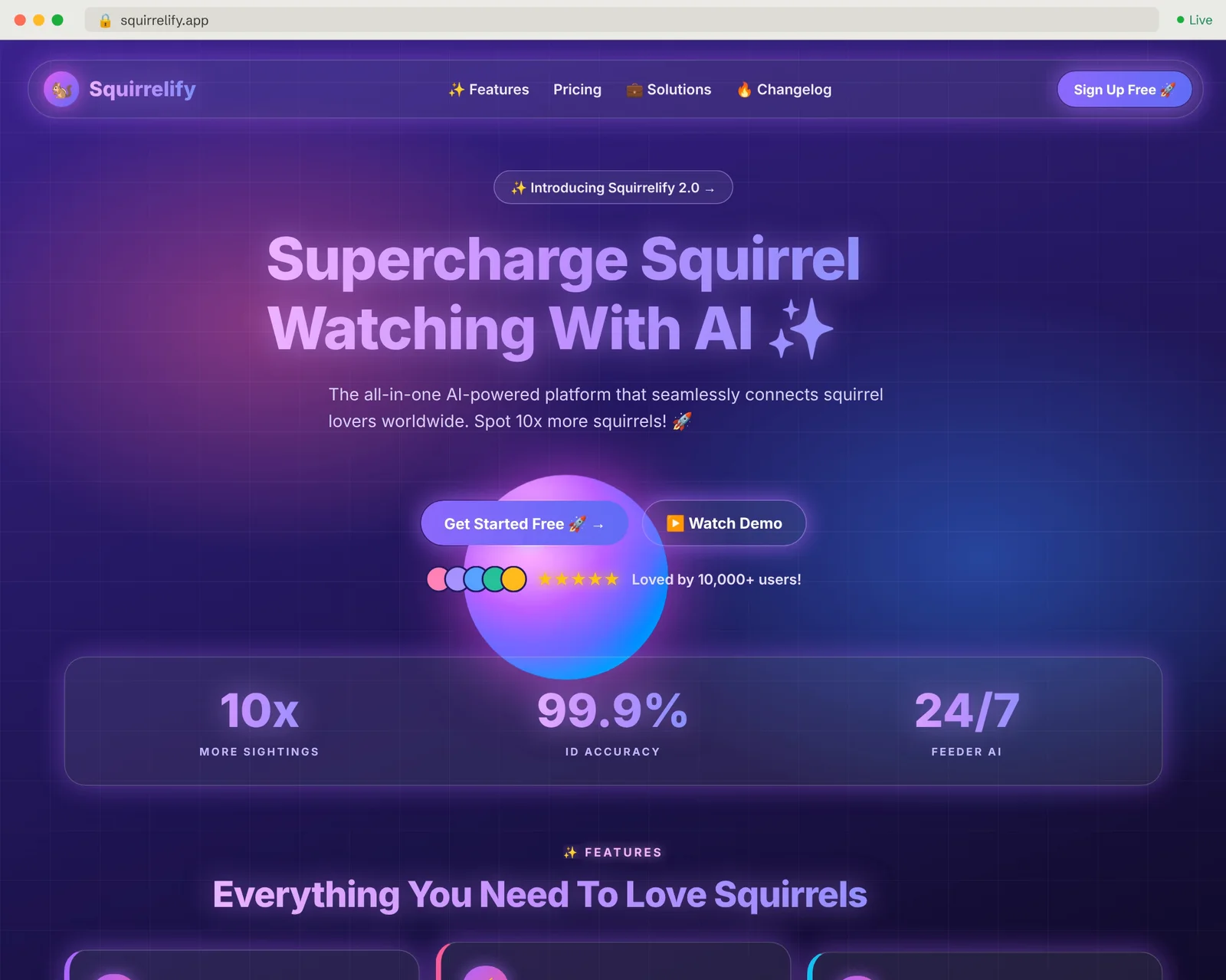
Spot it: violet-to-blue or purple-to-pink on the background, the buttons, the cards.
Fix: one neutral background, very slightly tinted toward your product's world (warm for food, wood, paper; cool for technical and night). One accent color, taken from your product, used on a few percent of the screen: the main button, the selection, one key number.
2. No gradient text.
Spot it: the headline, the logo or the stats in a shimmering gradient.
Fix: solid text in your primary text color.
3. Lose the glow.
Spot it: colored shadows around buttons, cards and pills (box-shadow: 0 0 20px purple).
Fix: delete them. Depth comes from surfaces one step lighter than the page and hairline borders at 6 to 10% opacity.
4. Delete the glossy blob.
Spot it: a floating 3D orb, nebula or blurred blob behind the hero.
Fix: show the product instead, or one real object from its world. No product shot yet? A plain background beats a blob.
Icons and copy
5. No emoji in the nav.
Spot it: ✨ Features, 💼 Solutions, 🔥 Changelog, 🚀 on the button.
Fix: words alone, or one line-icon set at one size and one stroke.
6. Drop the pill above the headline.
Spot it: a pulsing "✨ Introducing X 2.0 →" badge on top of the hero.
Fix: delete it. If it's real news, a quiet text link.
7. Say what it actually does.
Spot it: a headline that fits any product: "Supercharge your workflow with AI."
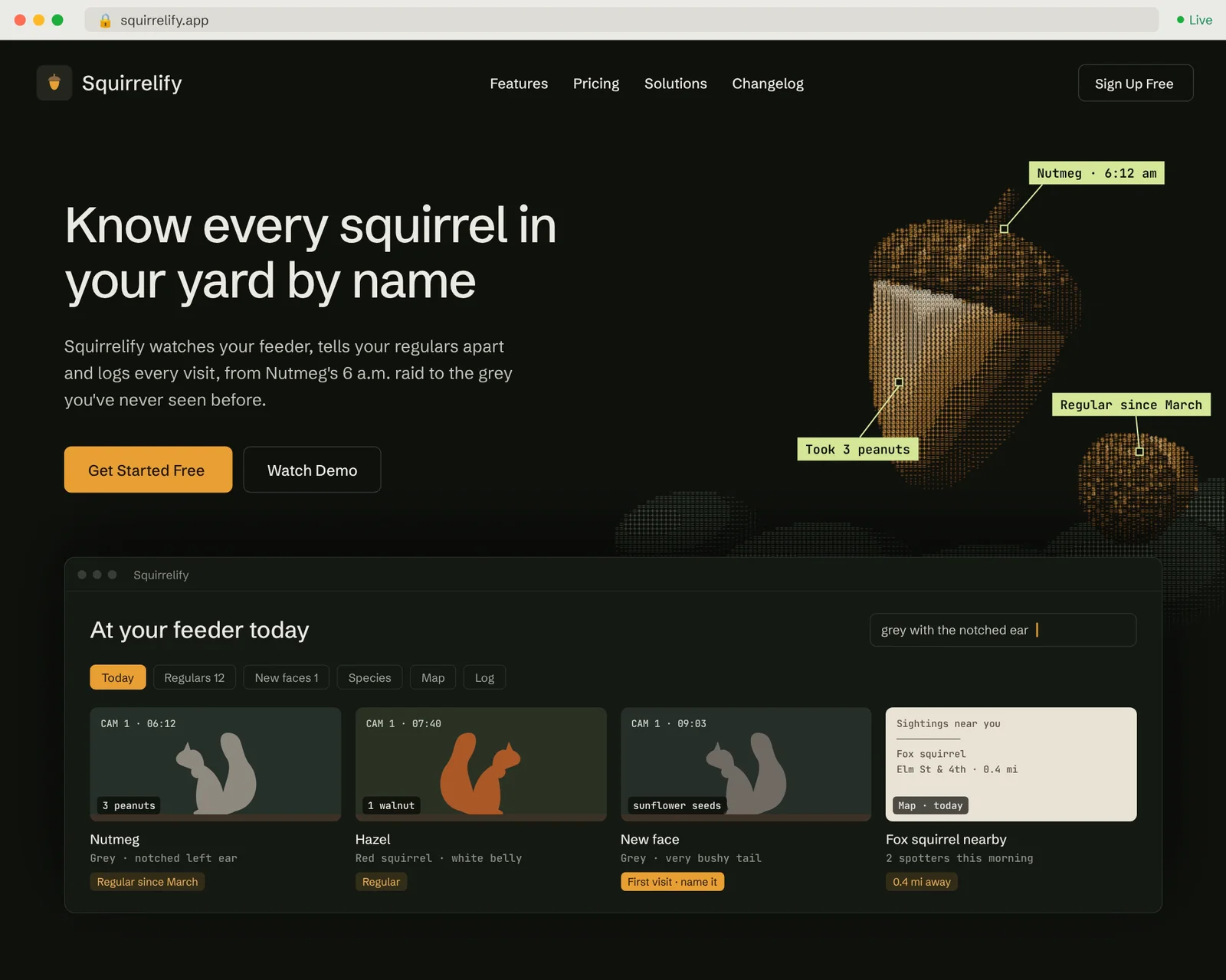
Fix: what it does, for whom, in plain words. Squirrelify went from "Supercharge Squirrel Watching With AI ✨" to "Know every squirrel in your yard by name."
8. Cut the hype words.
Spot it: seamless, unlock, supercharge, revolutionize, all-in-one, AI-powered, and exclamation marks.
Fix: one concrete sentence about what happens when you use it.
Layout and buttons
9. Stop centering everything.
Spot it: badge, headline, paragraph, buttons and picture stacked down the middle.
Fix: left-align the text and give the right side to the product or the one visual.
10. One main button, not three.
Spot it: two or three gradient buttons fighting, each with an arrow or an emoji.
Fix: one primary (filled, your accent) and at most one quiet secondary. Hero buttons 44 to 48 px tall.
11. No fake reviews.
Spot it: "Loved by 10,000+ users!", a row of avatar dots, five glowing stars with no source.
Fix: if it isn't real, delete it. If it is, make it specific and quiet: a named customer, a real number with where it came from.
12. Spacing on a 4-point grid.
Spot it: gaps like 13 px, 37 px, 22 px, whatever the model typed that day.
Fix: every gap from 4, 8, 12, 16, 24, 32, 48, 64, 96. Tight inside a group, wide between groups. Landing sections 80 to 128 apart.
13. Not every corner's a pill.
Spot it: the search bar, the buttons, the cards and the badges all fully rounded.
Fix: radius by size: 4 to 6 px for tags, 8 to 10 for buttons and inputs, 12 to 16 for cards. A corner inside another is smaller: inner = outer minus the padding between them.
Type
14. Pick a font that isn't Inter.
Spot it: everything in one sans at weight 800, the look every generator ships by default.
Fix: pick a family with character for your product and set headings at 400 to 500, size doing the work instead of weight. Free picks: Instrument Sans or DM Sans (warm), Geist or IBM Plex Sans (technical), Newsreader for a big headline only. (Squirrelify uses Schibsted Grotesk.)
15. Ditch the stat banner.
Spot it: "10x · 99.9% · 24/7" in a glowing box under the hero, numbers nobody measured.
Fix: delete it. A real number belongs next to the thing it measures, with its source.
16. No tiny ALL CAPS labels.
Spot it: small uppercase labels with wide letter spacing (FEATURES, MORE SIGHTINGS).
Fix: sentence case at normal tracking.
Cards
17. No icon box on every card.
Spot it: a gradient tile with an emoji on top of each feature card.
Fix: drop the tiles. A line icon only where it explains something, or nothing.
18. Make each card say something real.
Spot it: three identical cards: "Smart Detection", "Instant Insights", "Community Hub", one vague line each.
Fix: each card names one specific thing it does. Squirrelify's "Smart Detection: Detect every squirrel with the power of AI" became "Know who's who: Nutmeg has a notch in her left ear. Squirrelify spots it, so it knows her."
Motion and the one bright moment
19. Stop the bouncing.
Spot it: wiggling buttons, bobbing cards, a pulsing badge, a spinning logo.
Fix: nothing moves on its own. Motion only answers the user, with one easing curve for everything, cubic-bezier(0.22, 1, 0.36, 1): 120 to 180 ms for hover and press, 300 to 500 ms for things entering.
20. Give it one thing worth looking at.
Spot it: the whole page is equally loud, so nothing stands out.
Fix: keep the chrome quiet (nav, buttons, text) and put all the richness into one or two moments that belong to your product: a real view of the app with believable data, or one crafted object from its world. Squirrelify got an acorn drawn in glyphs and the app's feeder log with named squirrels.
No plugin? Paste this into Claude Code (or any AI that can edit your site)
Audit my landing page for these 20 AI-slop tells and list every one you find with where it lives: purple or hue-to-hue gradients; gradient text; colored glows; glossy blobs or orbs; emoji in the nav or labels; a pill badge above the headline; a headline that could fit any product; hype words (supercharge, seamless, unlock, revolutionize) and exclamation marks; everything centered; more than one primary button; reviews or user counts with no source; spacing off a 4 px grid; everything fully rounded; one sans at weight 800 everywhere; a stat banner of unmeasured numbers; small uppercase tracked labels; an icon tile on every card; identical vague feature cards; things that bounce or pulse on their own; no single product moment that stands out.
Show me the list and wait. Once I say go, fix them: one tinted neutral background and one accent from my product's world; solid text; depth from surfaces and 6 to 10% hairlines, no glows; spacing from 4, 8, 12, 16, 24, 32, 48, 64, 96; radius 12 to 16 for cards and 8 to 10 for buttons; one font family with character, headings at weight 400 to 500, sentence case; one primary button and one quiet secondary; delete what isn't real; motion only on interaction with one ease-out; and one bright moment that shows the actual product. Keep my content and the order of my sections. Screenshot before and after.
Sources
unslop by Damir Sokolovsky (@heydamir), CC BY 4.0: the checklist and the values on this page are built on its list of slop signs and its starting tokens. README and install lines read Nov 20, 2026.
- unslop on GitHubgithub.com/heydamir/unslop
- unslop by heydamirheydamir.design/unslop
- The Unslopping series on Xx.com/heydamir
- Damir Sokolovsky on X@heydamir
Squirrelify: a fictional product made for the reel by @murphmaxxing.